
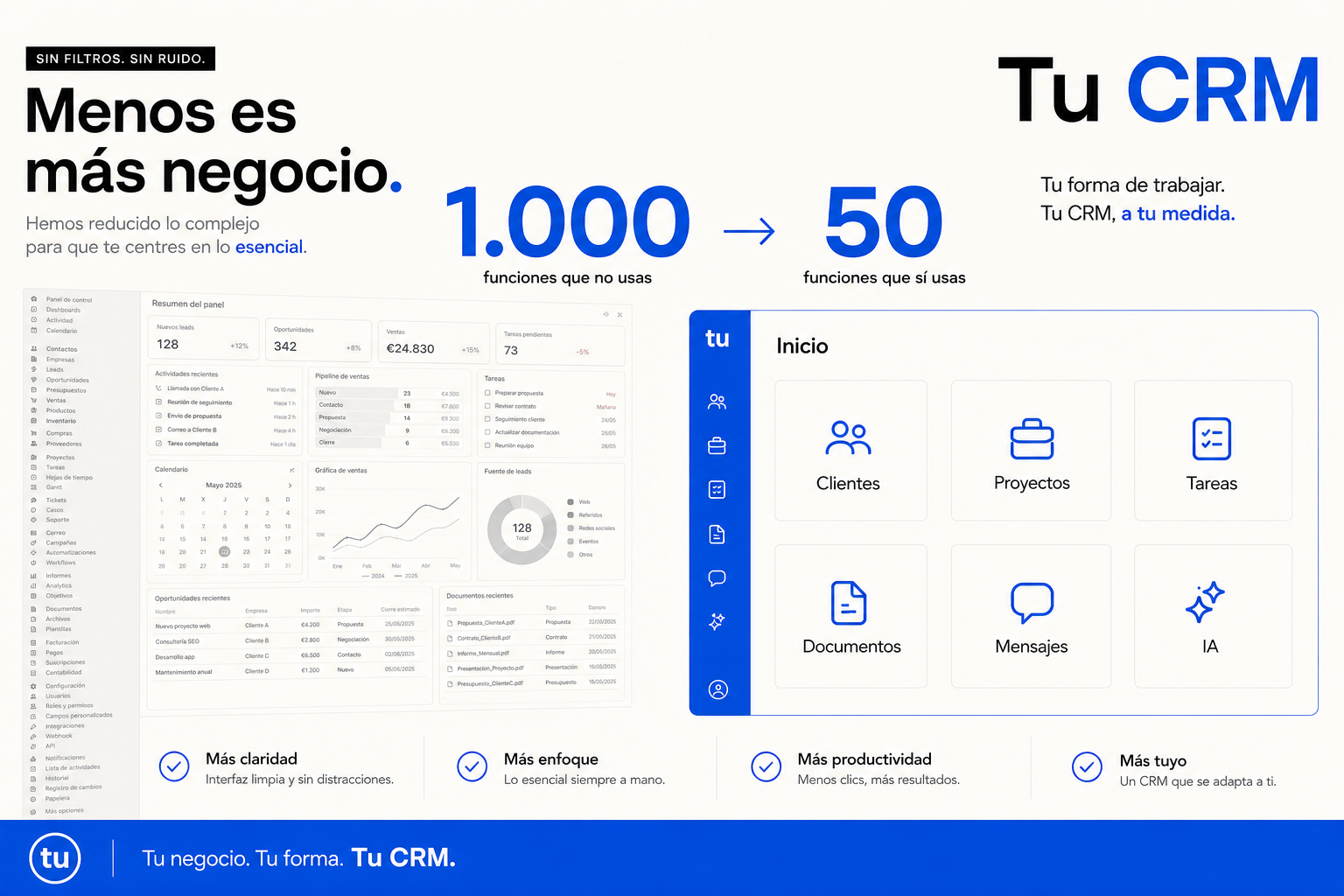
You use 6.
Custom CRM · bespoke software
Your business isn’t generic.
Why should your CRM be?
HubSpot, Salesforce, Pipedrive, Zoho, Monday, Odoo, Dynamics… The market is full of big platforms. The problem is that each one tries to serve thousands of different business types.
- You may only need 5% of everything they offer.
- We can design a CRM with only what you need, organised the way you work.
- Clients
- Projects
- Tasks
- Documents
- Messages
- AI
Exactly what you need.
The problem isn’t that CRMs are bad. The problem is they were designed for many businesses. Not for yours.
There are hundreds of options. And many are excellent.
Today’s CRMs can be extraordinarily complete products: automation, marketing, sales, support, reporting, integrations and AI.
But the more generic a platform has to be, the more decisions it makes for you: how things are named, how a process is organised, which statuses exist, how a record works, how data relates, permissions and flows.
And your company ends up adapting to the CRM.
The thesis
It’s not just “paying for things I don’t use”.
1,000
features available
You need
50
And 12 of them should work differently.
The real problem: what you do use doesn’t work exactly the way you need.
Small workarounds add up.
- “We have to add another status here because the CRM won’t allow ours.”
- “This field actually means something else.”
- “Then we copy it into Excel.”
- “For this process we use another tool.”
- “We always explain this manually to new hires.”
- “It can’t be done exactly that way, so we do it this other way.”
One small exception doesn’t seem important. Fifty exceptions end up defining how your company works.
Building your own software no longer necessarily means building a monster for a year.
Before, you chose the software closest to your business. Now you can also consider building software around your business.
01 / Custom
We don’t want to rebuild Salesforce.
And you probably don’t need that either. There’s no point building 300 modules, 200 screens or a marketplace if you only need clients, projects, follow-up, documents, calendar, WhatsApp, automations, a dashboard and AI.
Your business vocabulary
Not Deal → Pipeline → Opportunity if you talk about Client → File → Project → Deal → Booking → Case → Community → Candidate.
- Client
- File
- Project
- Deal
- Booking
- Case
- Candidate
Your process
You don’t adapt to the pipeline. The pipeline adapts to you.
Generic CRM
- Lead
- Qualified
- Proposal
- Won
Your business
- Request received
- Docs pending
- Technical review
- Quote
- Client approval
- Production
- Completed
- Follow-up
Sales
Clients, opportunities, follow-ups.
Operations
Projects, tasks, documents.
Leadership
Dashboard, KPIs, blockers.
Admin
Billing, documents, clients.
No endless menus. No screens nobody uses. No training on irrelevant modules.
03 / Integrations
A custom CRM doesn’t have to live in isolation.
It can connect to email, Google Workspace, Microsoft 365, WhatsApp, Slack, Teams, Stripe, calendars, ERP, accounting, Drive, e-signature, APIs, web and forms.
- Web
Your CRM
- ERP
- Documents
- AI
- Calendar
- Portal
Client
“Hi, I wanted to know how my request is going.”
Client identified · project located · context available
AI
“Draft ready with the current project status.”
Marta replies personally
WhatsApp and email inside the system
A conversation can become work. Email identifies the client, project, attachments and actions — without copying between inbox and CRM.
AI when it helps
Triage, drafts and classification.
A person when it matters
Takeover with full context.
04 / AI
Don’t add AI because it looks good on a feature list. Build it where it actually saves work.
Command bar
Ask your company…
- “ACME”
- “blocked projects”
- “clients waiting for a reply”
- “outstanding invoices”
- “what do I need to do today”
Summaries
“Summarise everything that happened with this client.”
Blockers
“Which projects are blocked?”
Documents
“Find everything related to ACME.”
Follow-up
“Which clients haven’t been contacted in 30 days?”
05 / Automation
If your process is unique, automation can be too.
- 01
New client
Created in the system.
- 02
Project
Create and assign.
- 03
Folder
Documents ready.
- 04
Form
Request data.
- 05
WhatsApp
Notify the client.
- 06
Task
First internal action.
Start small. Add only what shows up as a real need.
Clients · Projects · Tasks
Operating core.
WhatsApp · Documents
Conversation and files.
Automations · AI
Flows and copilot.
Portal · Analytics
Client and metrics.
Features don’t have to depend on the plan you buy.
No Basic / Professional / Enterprise to unlock a feature. In your software we decide what should exist because the business needs it.
Infrastructure, APIs and maintenance still exist — but product logic doesn’t depend on another vendor’s commercial catalogue.
Ownership and control
Code, infrastructure, data, APIs, documentation, access and roadmap — agreed for your company.
- Code
- Data
- APIs
- Roadmap
Sometimes you should use HubSpot. Seriously.
If your process is standard and an existing platform covers almost everything, building from scratch probably doesn’t make sense.
Custom makes sense when
You only use part of the CRM, you have very specific processes, the team works around limitations, you duplicate information, you live in Excel, you need custom integrations or AI deep in the process.
Does exploring your own CRM make sense?
Tick what sounds familiar.
If you ticked several: it’s worth running the numbers.
Study our caseStandard CRM vs custom CRM
There’s no universal answer. There’s the right solution for each company.
Standard CRM
- Ready immediately
- Huge feature set
- Existing integrations
- Broad ecosystem
- Configuration without development
Custom CRM
- 100% your own process
- Specific interface
- Only the features you need
- Particular integrations
- AI deeply integrated
- Roadmap controlled by you
What we can build
Client 360
The full client context.
Custom pipeline
Your real process.
AI Inbox
Email and messages connected.
WhatsApp
Conversation inside the CRM.
Document Hub
Files tied to clients and projects.
Automation Engine
Business-specific flows.
Client Portal
A private space for clients.
AI Copilot
Questions about your company.
Dashboard
Only the indicators you use.
Law firm
Client → matter → documentation → deadlines.
Accountancy
Client → requests → documents → due dates.
Insurance broker
Client → policies → renewals → claims.
Recruitment
Client → vacancy → candidates → interviews.
Real estate
Lead → property → viewing → offer.
Consultancy
Client → proposal → project → deliverables.
The CRM changes because the business changes. That’s precisely the point.
06 / Process
We don’t start by coding.
Understand
How your company works today.
Map
Clients, processes, statuses, data and integrations.
Simplify
What’s truly needed and what can go.
Design
The interface around your team.
Build
A first working version.
Evolve
New needs → new features.
Maintenance
Having your own software doesn’t mean being left alone with it.
Infrastructure
Hosting, monitoring, backups, security.
Evolution
Integrations, APIs, AI, UX and new features.
Before and after
Not necessarily everything inside the CRM — but everything connected around the same business logic.
Before
- CRM
- Excel
- Drive
- Zapier
- Notes
- “Ask Carlos”
Your system
- Clients
- Processes
- Documents
- Conversations
- Automation
- AI
For years the question was: “Which CRM looks most like my business?”
Maybe now it can also be: “What would a CRM built exactly for my business look like?”
Don’t buy another CRM before you run the numbers.
Maybe HubSpot is exactly what you need. Maybe Salesforce. Maybe Odoo. Or maybe your company already has enough specifics that building something of your own makes much more sense than it seemed a few years ago.
We analyse your process, current tools and needs to determine whether a custom CRM makes sense.